UI/UX Design Process Steps: A 10-Step Actionable Guide to Craft Winning Designs (+ Expert Tips)

An effective UI UX design process involves a UX methodology of understanding customer needs, thorough research, tailored UI UX design, iterative development, and in-depth testing, resulting in digital products that meet both user requirements and business goals.
The term ‘user-centered design’ was introduced in the late 1990s by the renowned designer and cognitive psychologist, Donald Norman. Since then, extensive research across various industries has focused on leveraging this approach to improve user experiences. Norman famously said:
“The design of any product must always be driven by the users' needs, goals, and expectations.”
These words capture the core value of a systematic and efficient UI UX design process. Norman was deeply involved in the UI UX design process when designing his first Apple product, meticulously planning each stage of the UX design process flow. His principles later became the foundation for UI/UX design methodologies adopted by major tech giants like Microsoft, Hewlett Packard, and others.
An exciting and simple user interface will capture a user. Such an interface and clutter-free uiux design will take the user on an experience that we design for them. Clarity is key to design to attain this feat.
Keeping all this aside. We intend to give you an insight into the various steps involved in the user experience design process through this writing. But at the same time, we will be seeing the basics on our way, for example, definitions of basic terms, UX design process, what is ui/ux, what is a ui ux designer, ux process flow and so on.
So keep reading!
What is User Experience?
User experience is the value that the end-user gets while using your product. It all depends on enhancing customer satisfaction by improving the usability, accessibility, and pleasure when a user interacts with your product.
What Is the UI UX Design Process?
The UI UX design process is a structured way of designing your digital products so they are easier to use, easier to understand, and more aligned with user needs and business goals.
It brings together multiple activities such as discovery, UX research, analysis, information architecture, flow mapping, wireframing, prototyping, validation, interface design, and post-launch refinement. In that sense, it is both a creative and strategic system.
UX vs UI Within the Design Process
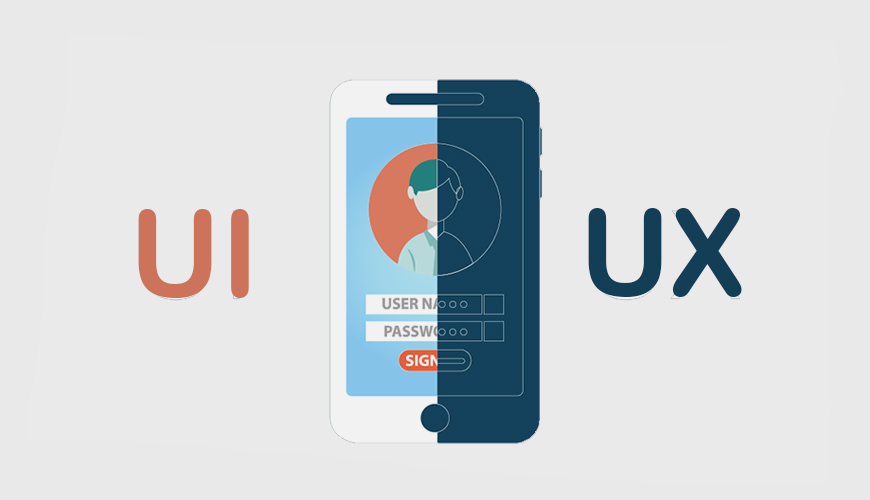
While the UX design process focuses on how your product works and how users accomplish tasks, the UI layer focuses on how those decisions are communicated through the interface.
UX design focuses on:
- Understanding your users’ behavior and expectations
- Defining task flows and user journeys
- Structuring your product for better usability
- Reducing friction during interactions
UI design focuses on:
- Visual hierarchy and layout
- Typography and color systems
- Interaction feedback and micro-interactions
- Overall interface aesthetics
Together, they form a complete user experience design process where functionality and presentation work together to create meaningful product experiences.
Why User Experience Matters?
A well-designed user experience is crucial for building trust and fostering positive customer relationships. It directly influences how users perceive your brand, how easily they can navigate your product, and whether they can accomplish their goals efficiently.
Good UI UX design enhances customer confidence in your brand. When users find a product easy to use, intuitive, and visually appealing, they are more likely to stay engaged and return. This leads to greater customer satisfaction, repeat business, and stronger brand loyalty.
For businesses, a well-crafted user experience is a key driver in meeting broader goals, whether it's increasing conversions, boosting user retention, or differentiating from competitors.
One of the core principles in UI/UX design should be simplicity. As Steve Jobs famously said, “Simplicity is the ultimate sophistication.” The most successful products are often those that present their features in the clearest and most user-friendly way. This simplicity not only enhances usability but also ensures that users don’t feel overwhelmed, making them more likely to adopt and engage with your product.
What a Good UI UX Design Workflow Looks Like?
UI/ UX Design is a part and parcel of the product development process. It is what decides the future or success of your product.
The best approach or an airtight ux methodology for a successful UI UX design is by combining the structure, content, and the user experience in a certain way, so that it enables your business to accomplish the goals.
In the UI UX Design workflow, follow a user-centric approach. Adopting this ux design method will enable you to develop simple, intuitive, and engaging micro-moments which thrill the end-users.
What is ui ux, if it does not serve, compel, and delight a user?
The above mentioned ux design method creates a push factor that makes you stand out from the crowd!. This is very much important if you want to become a good UI UX designer.
The 10 Essential UI UX Design Process Steps
The UI/UX Design Process is a ux methodology that, if followed, allows you to polish your user interfaces to be the best one possible for your business.
You may be wondering which of the following is the first step in the design process?
Like with any process, there are some fundamental steps/phases that can be considered for the ux design process.
How these steps are used or followed varies from project to project based on multiple factors. UX design process is all about experimentation, learning from experience and there are no hard and fast rules.
The various steps of design process in the User experience design process are as follows:
Step 1: Product Definition
UX design process begins with defining the product. Product Definition is the first step in ux process or alternatively called the user design process. The team responsible for this will collect the user requirements based on their business environment.
It’s a critical step in ux design process because understanding about the real scope of the product and their existence happens in this phase.
It’s simple; before beginning the work, enlighten your UI/UX designers about the requirements!
People involved in this phase of the ux design process are Design Team, Business Manager, and Product Manager. The entire team should consult with clients in their environment.
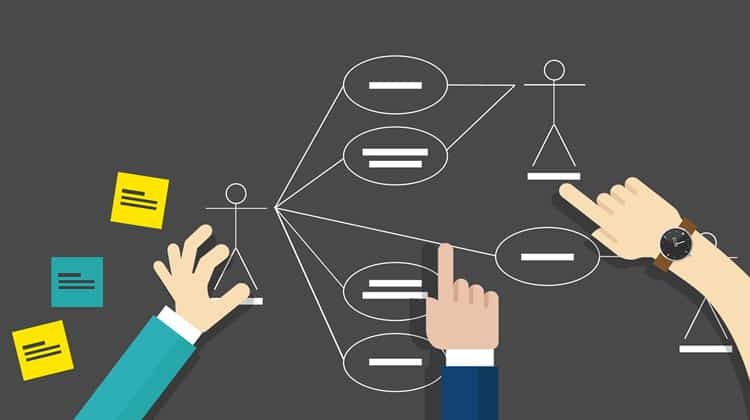
Analyze their needs within the framework of your operation. The significant outcomes of this phase are User Personas, User Stories, and Use Case Diagrams.
Expert Tip
Document everything in a project brief, including personas, goals, and deliverables. This becomes your team’s single source of truth.
Step 2: UI/ UX Research
The UI/ UX research is the most crucial element for a ui ux designer. The designing team studies how the present system works for the current client proposal. The three main functions at this stage are:
- Have an understanding of the competition.
- Making a thorough study of your existing domain.
- Going through competitor strategy to test outcomes.
The UI UX research in ux design process should also involve an understanding of the latest UI/UX trends, UI UX design principles, online catalogs and guidelines.
Expert Tip
Build a Research Repository to centralize insights. Tools like Dovetail can help store, analyze, and share findings efficiently.
Step 3: Analysis
In this phase, make use of the things collected in the ui ux research phase. With the help of the information received, create hypothetical personas, and experience maps.
Hypothetical Personas:
Creating hypothetical scenarios helps the ui ux designers to know about the various people who will be the users of your product. It allows depicting the realistic representation of the ultimate product. The design team can figure out how it is going to look like after delivery.
Experience Maps:
Experience maps show the user flow within your final product. All these are done using visual representations through proper interactions with the client in the product definition phase.
Expert Tip
Present findings through storytelling techniques to help stakeholders empathize with users.
Step 4: Information Architecture (IA)
This UI/UX design process step is really important and every UI/UX designer puts in earnest efforts to bring out a flawless digital product. Information architecture (IA) is all about organizing and structuring content so users can navigate your product effortlessly. A clear IA reduces cognitive load, enhances usability, and ensures users can achieve their goals with minimal effort.
Check out the steps our team follows to Build strong IA
1. Define Content Hierarchy
- Perform a content audit to understand what’s available and needed.
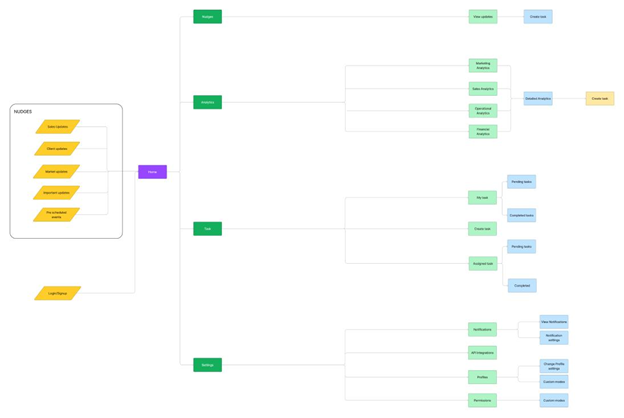
- Organize content logically based on user priorities and behaviors as we did for BiCXO. Read more : Dashboard UI/UX Design Done Right: BiCXO’s Journey to Executive Intelligence Excellence
2. Create Sitemaps
- Visualize the structure of your product, including navigation paths, categories, and linked pages.
- Use tools like Lucidchart to design and refine sitemaps.
3. Validate Navigation
- Conduct tree testing or card sorting to ensure users can intuitively navigate the structure.
- Example: Use Optimal Workshop to test how well users can find content.
Challenges (and Solutions)
1. Overloading Users
- Use analytics to prioritize frequently accessed content.
2. Unclear Terminology
- Test labels and categories with real users to ensure they align with user expectations.
So, a well-structured IA is the backbone of an intuitive user experience. Without it, users can get lost or frustrated, leading to abandonment.
Expert Tip
Test your IA with representative users early in the process to ensure it matches their mental models.
Step 5: Design
In the ui ux design process, we finally end up giving life to ideas that we have collected in the above four steps. It’s time to work on the final graphics now. The design team will execute the final design in this phase.
The significant outcomes of the designing phase are:
Sketching:
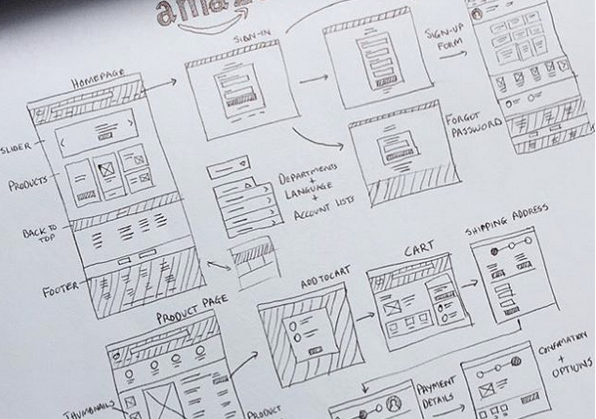
The designing phase begins with sketching. The designers usually make handmade sketches to visualize the concept with simple terms. The UX/UI designers can stick to a particular option after the sketching process.
Creating wireframes:
A wireframe is a visual structure that depicts the page hierarchy and the elements in the product. A wireframe is considered as the backbone of the product. It’s also called the skeleton of the ux/ui design. It’s mostly about the overall look of the final product.
Creating Prototypes:
Prototypes concentrate on the feel of the UI/UX product that one is designing. It’s more about the interaction experience. Prototypes give you the effect of a simulator.
Creating Design Specifications:
Design specification includes user flow and task flow diagrams. It depicts the overall working and the style requirements of the UI/UX product. It describes the processes and graphical elements to create amazing user experiences.
Expert Tip
Share prototypes early with stakeholders and users to gather feedback and refine designs iteratively.
Step 6: Validation or Testing
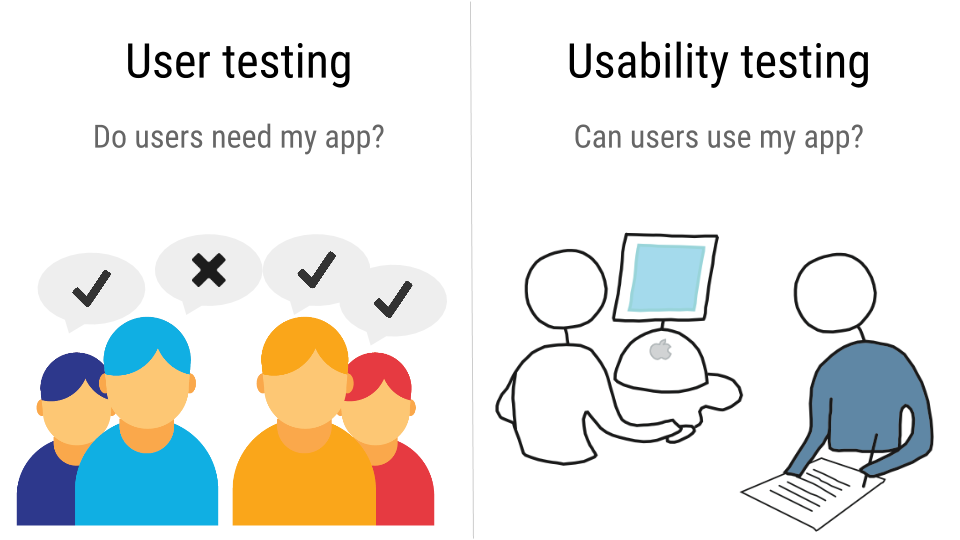
“Usability testing is the practice of putting designs to the test with real people to gather information about the user experience – how difficult or easy it is to use the product.” -Usability-Testing.org
As explained above, usability testing is a technique for evaluating a website's, app's, or other digital product's user experience by testing it with real users, giving them tasks to perform and watching them interact with it. The testing may be conducted on a website,mobile app or a design prototype.
The main objective of usability testing is to determine how user-friendly a website/app is, what parts of it are confusing for the end-user, and how easy it is to accomplish their goals with the product.
Why is usability testing necessary?
- To find out how users interact with your product
- To discover where and why users get confused
- To uncover usability and ui ux design issues, improve them and boost conversions
- To save money and time on fixing issues later on
There are primarily two approaches to usability testing:
- Moderated :Requires a presence of a UX researcher to guide users through the whole testing process, give tasks and follow their behavior.
- Unmoderated :This is a much cheaper way of testing that can be conducted anywhere, anytime, with no researcher present. A user is completing tasks without intervention, while an online tool is observing the responses and gathering data.
Unmoderated testing requires an online tool to perform the study. They offer deep analytics and help you to streamline the process of testing. There are many Usability Testing Guides , which explain the process step-by-step and can help you set up your own Usability Testing study.
Expert Tip
Test iteratively and in small cycles to identify and resolve issues early.
Step 7: Interaction Design
Interaction design (IxD) focuses on how users interact with your product. From button clicks to animations, this step ensures that every interaction is intuitive, engaging, and seamless. A well-thought-out interaction design can transform static visuals into dynamic, user-friendly experiences and it is one of the important steps in the UI design process.
How do we carve out design interactions
1. Define User Flows
- Map out the steps users take to achieve specific goals, like making a purchase or signing up.
- Use tools like FlowMapp to create detailed user flow diagrams.
2. Design Micro-Interactions
- Add interactive elements like hover effects, loading animations, and button feedback.
- Example: A button changing color when clicked provides immediate feedback.
3. Prototype and Test Interactions
- Use tools like ProtoPie or Figma to prototype and validate interactions.
- Test these prototypes with users to ensure they are intuitive.
4. Focus on Accessibility
- Design microinteractions that work for all users, including those with disabilities.
- Example: Ensure keyboard navigation and screen reader compatibility.
Spotify’s interface includes smooth transitions and engaging animations when users add songs to playlists, enhancing the overall experience.
Challenges (and Solutions)
1. Overloading Users with Effects
- Use animations sparingly to avoid overwhelming users.
2. Maintaining Consistency
- Standardize interaction patterns across your product to reduce confusion.
Great interaction design makes products feel alive, ensuring users can engage with them effortlessly and enjoyably.
Expert Tip
Test interactions on different devices and screen sizes to ensure consistency and responsiveness.
Step 8: Visual Design
Visual design enhances the product's aesthetics while supporting usability. It focuses on elements like typography, color, and layout, creating a visually appealing and cohesive user experience. A strong visual design builds brand trust and encourages user engagement. Nevertheless, our team never consider visual design as something unrelated to UX design , we consider it as an integral part of the UI/UX design methodology.
Here is how we approach this UI process step
1. Create a Design System
- Develop reusable UI components and style guides to maintain consistency.
- Use tools like Storybook to manage your design system.
2. Choose Typography and Colors
- Select fonts that are readable and align with the product’s tone.
- Use color psychology to evoke specific emotions (e.g., blue for trust).
3. Focus on Branding
- Incorporate brand-specific elements like logos, mascots, and unique color palettes.
- Ensure the design reflects the brand identity throughout.
4. Test for Accessibility
- Check contrast ratios and font legibility to meet accessibility standards.
- Tools like Stark can help ensure your designs are inclusive.
For instance, Apple’s minimalist visual design emphasizes simplicity, clean layouts, and consistent typography, reinforcing its premium image.
Challenges (and Solutions)
1. Overcomplicating Designs
- Simplify by focusing on functionality and user goals.
2. Handling Subjective Feedback
- Use A/B testing to validate visual design decisions objectively.
Strong visual design captures user attention and builds trust while ensuring the interface is functional and user-friendly.
Expert Tip
Design with scalability in mind to accommodate future updates or rebranding needs.
Step 9: Development Handoff
The development handoff phase ensures that your designs are implemented accurately. Clear communication and detailed documentation are crucial to bridging the gap between design and development.
These are our carefully curated steps to streamline handoff
1. Annotate Designs
- Add detailed notes explaining the purpose and functionality of UI elements.
2. Provide Specifications
- Share measurements, assets, and CSS snippets using tools like Zeplin or Figma’s Inspect Mode.
3. Collaborate Closely with Developers
- Schedule regular check-ins to address questions or roadblocks.
- Foster a collaborative environment to maintain alignment.
Challenges (and Solutions)
1. Miscommunication Between Teams
- Use collaborative tools like Slack or Asana to clarify any doubts quickly.
2. Missing Assets or Specifications
- Prepare a checklist of all required deliverables to avoid delays.
A smooth handoff minimizes errors, ensures designs are implemented as intended, and saves time during development.
Expert Tip
Use tools like Zeplin to streamline the handoff process and provide developers with everything they need in one place.
Step 10: Post-Launch Monitoring and Iteration
Launching your product isn’t the end—it’s just the beginning. Post-launch monitoring allows you to track user behavior, gather feedback, and make iterative improvements to keep your product relevant and user-friendly. And this is the UI/UX design process step we love because this helps us analyze the changing use behaviors and apply the insights on iterating the product.
Steps to Monitor and Iterate
1. Track Key Metrics
- Use tools like Google Analytics to monitor bounce rates, session durations, and conversion rates.
2. Gather User Feedback
- Collect feedback through surveys, interviews, or in-app tools like Typeform or Survicate.
3. Analyze and Iterate
- Use data insights to refine features, fix usability issues, and prioritize updates.
- Example: Address user-reported bugs or introduce highly requested features.
Challenges (and Solutions)
1. Handling Negative Feedback
- Prioritize constructive criticism and focus on actionable insights.
2. Managing Iterative Updates
- Maintain a clear update roadmap to manage priorities effectively.
Continuous iteration ensures your product adapts to evolving user needs, stays competitive, and delivers lasting value. This is why Instagram regularly iterates on features like Stories and Reels, driven by user engagement metrics and feedback.
Expert Tip
Create a post-launch update plan to systematically address user feedback and maintain momentum.
How does Aufait UX follow the UX UI design process in client projects?
As a leading UI/UX design agency in India, we work with businesses of all scales, ranging from startups to enterprises. Our well-defined ui ux design process ensures smooth and efficient operations, and our proficiency in executing these processes has garnered excellent customer feedback and remarkable results. Here are the key steps we follow in our ux processes.
Understand the customer needs
We start with a solid plan to understand the scope of the product and client requirements. To do this, we set up multiple discussions with the client involving the key stakeholders and our team members.
Effective UX research
In-depth research is carried out to assess the market situation and the competitor products. We also conduct user research to identify user requirements, expectations, and pain points.
Tailor made UX design
Our team then collaborates to analyze the valuable insights gathered during the research phase. In order to design the products with utmost accuracy and precision, we prepare user personas, user flows, and journey maps. This enables us to shape the design to meet the unique requirements of the target users.
Iterative Designs
We employ a multi-step approach to ui ux design process, creating sketches, wireframes, and high-fidelity prototypes. The designs undergo iterative testing to ensure that they meet the highest standards of usability and functionality.
In-depth testing
We test the designs using various testing methods to carefully assess our work and check that it meets the user requirements.
Efficient communication and collaboration within the team help us carry out each step of the design process with ease and perfection
Conclusion
A systematic and organized ui ux design process can be of real value to design a usable experience and amazing interface for a digital product. With the right UI/UX design process strategy in place, collaboration and communication within the team becomes more effective and structured. This can help you deliver user experiences that satisfy users and help businesses achieve their goals.
Turn Your Product Ideas into Meaningful User Experiences
Designing a successful digital product requires a thoughtful UI UX design process that puts your users at the center of every decision.
At Aufait UX, we combine research-driven insights, strategic design thinking, and proven UI UX design methodologies to help businesses build intuitive and scalable digital experiences.
Explore our UI design services and UX design services
Whether you are designing a new product, improving an existing platform, or refining complex user workflows, our team can help you create experiences that users truly value.
Looking to design a product your users will love? Let’s build it together…
👉 Connect with our design experts to start shaping your next digital experience.
Follow Aufait UX on LinkedIn for strategic insights grounded in real-world product outcomes.
Disclaimer: All images belong to their respective owners.
Frequently Asked Questions
The design process in UI/UX is a structured approach used to create user-centric digital experiences. It involves several key steps, including research, analysis, ideation, prototyping, and testing. This process ensures the product not only looks great but is also functional, intuitive, and aligned with user needs. A strong UI design process incorporates visual design elements, while the UX process focuses on understanding user behaviors and creating solutions for their challenges.
UI/UX design refers to the creation of user interfaces (UI) and user experiences (UX) for digital products like websites or mobile apps. While UI focuses on the visual elements—such as buttons, typography, and layouts—UX design involves understanding user needs, creating user flows, and improving the overall journey of interacting with the product. Together, UX UI design ensures both form and function come together seamlessly.
The steps of the design process in UI/UX typically include:
• Product Definition: Understanding the product’s goals and aligning them with user needs.
Research: Gathering data on user behavior, needs, and market trends (a critical step in any UX process).
• Analysis: Synthesizing research findings into personas, journey maps, and pain points.
• Information Architecture (IA): Structuring content to ensure users can navigate efficiently.
• Wireframing and Prototyping: Designing low-fidelity and high-fidelity layouts to visualize the user flow.
• UI Design Process: Adding branding, typography, and colors to create polished designs.
• Interaction Design: Designing micro-interactions and animations to enhance usability.
• Testing and Validation: Ensuring the design works as intended through usability testing.
• Development Handoff: Delivering designs to developers with all required assets.
• Post-Launch Monitoring: Iterating on the design based on user feedback and performance metrics.
While UX and UI design often overlap, they focus on different aspects of the product:
• UX Design Methods: These involve understanding users, analyzing their needs, and creating intuitive workflows. Techniques like user personas, journey mapping, and usability testing are key here.
• UI Design Process: This involves creating the visual aspects of the product, such as layouts, colors, and typography, to ensure the interface is appealing and consistent.
At Aufait UX, UI design is delivered as part of a broader user experience design process, ensuring that the interface supports usability, accessibility, and smooth task completion.
The UX process is essential because it ensures your product meets real user needs. By following UX design methods like user research, prototyping, and testing, designers can reduce assumptions, minimize risks, and create solutions that resonate with users. A robust UX process leads to higher user satisfaction, reduced churn rates, and better business outcomes.
Research is one of the foundational steps of the design process. It helps designers:
• Understand the target audience’s needs and behaviors.
• Analyze market trends and competitors.
• Validate assumptions with data-driven insights.
Both UX and UI designers rely on research to inform their decisions. UX design methods like contextual inquiry and competitor analysis ensure that designs are user-focused and competitive.
The UI design process is a critical part of creating a cohesive product. While the UX process focuses on the functional and experiential aspects of the design, the UI process ensures those functions are presented in a visually appealing and accessible way. For example:
• UX: Defines the user flow for a shopping cart process.
• UI: Designs an attractive, easy-to-use interface for the cart.
Together, they create a seamless product experience.
Popular UX design methods include:
• User Research: Using interviews, surveys, and focus groups to gather insights.
• Personas and Journey Mapping: Creating user profiles and mapping their interaction with the product.
• Prototyping and Usability Testing: Building and testing prototypes to identify and resolve usability issues.
These methods ensure the product aligns with user expectations at every stage of the UX process.
Knowing what UI/UX entails helps teams approach projects holistically. By understanding that UX focuses on user needs and UI enhances the visual experience, teams can design products that are both functional and aesthetically pleasing. A strong grasp of "what is UI UX" ensures alignment between design and user expectations.
Testing is one of the most critical steps of the design process. It helps validate design assumptions and identify usability issues before launch. Testing methods, such as A/B testing and usability tests, are essential parts of both the UX process and UI design process, ensuring the final product performs well and meets user needs.
Common tools include:
• For UX Design Methods: Hotjar (behavioral analytics), Maze (usability testing), and Dovetail (research repository).
• For UI Design Process: Figma (design and prototyping), Adobe XD (interactive prototypes), and Zeplin (developer handoff).
The UI/UX design process typically takes 4–12 weeks, depending on project size, complexity, and the depth of user research required. Simple websites or apps can be completed in 4–6 weeks, while larger SaaS products or multi-flow applications may take 12 weeks or more. The timeline usually includes research, information architecture, wireframing, UI design, and usability testing. A structured UX process ensures faster decision-making, fewer revisions, and a more user-centered final product.
A thoughtful user experience design process ensures that users can quickly understand how a product works and complete their tasks without confusion. When the interface is intuitive and workflows are well structured, users require less training and support. This leads to faster onboarding, higher feature adoption, and stronger long-term engagement. Organizations that follow a structured UI UX design methodology often see improved product adoption and reduced support costs.
Yes. The UI UX design process is highly valuable for improving existing platforms. Through UX research, usability testing, and workflow analysis, teams can identify friction points in the current experience. These insights help redesign navigation, simplify workflows, and improve interface clarity. At Aufait UX, UX design audits and usability evaluations are often used to enhance existing digital products without rebuilding them from scratch.
The UI UX design process is platform-independent, meaning the same design principles can be applied across various digital products such as SaaS platforms, enterprise applications, data dashboards, mobile apps, web applications, and internal business tools. At Aufait UX, our designs are implemented across multiple platforms, including Power BI dashboards, SaaS products, and enterprise analytics systems.
Table of Contents
Ready to elevate your product design to the next level?
Hire us to create cutting-edge UX/UI designs that captivate, engage, and convert.
Contact us