Website Accessibility Standards: The Actionable Steps to Build an ADA Compliant Website


Explore 7 practical steps to guarantee ADA compliance on your website. Ensure inclusivity and avoid legal hassles with our actionable guide.
Summary
Building an inclusive website is both a moral and legal imperative. Under the Americans with Disabilities Act (ADA), businesses, organizations, and government agencies across the US are legally obligated to ensure their websites are fully accessible to all users, regardless of ability. This guide covers the Web Content Accessibility Guidelines (WCAG) and 7 actionable steps toward achieving WCAG compliance and stronger digital accessibility, from color contrast and readable fonts to alt tags and seizure-safe content.
Get complete insights on achieving ADA compliance for your website, a vital step toward broadening your customer base and ensuring sustained business success.
Over 1.5 billion people worldwide have disabilities, as per the 2018 United Nations Report on Persons with Disabilities. Here are the questions for all of us to ponder: Are the websites we browse every day accessible to all, including people with visual and hearing disabilities? Are we genuinely providing equal treatment to all users? For most of us, the answers may not be affirmative.
The Americans with Disabilities Act (ADA), enacted in 1990, has played a significant role in addressing these concerns to a great extent. This landmark legislation in the United States prohibits discrimination based on disability and requires equal access to public places, including digital spaces.
In this article, we will explore seven important points to ensure ADA compliance, helping you make your online content more inclusive for all. By understanding the ADA Act principles and using these strategies, you can make a difference in the lives of many, creating a more accessible online space for everyone.
What is ADA Compliance, and What Do They Require For Your Website?
The Americans with Disabilities Act is a civil rights law that prevents discrimination based on disability. The goal of this act is to ensure that those who have physical and cognitive disabilities are included in all areas of public life.
In 2010, the U.S. Department of Justice introduced the Americans with Disabilities Act Standards for Accessible Design, which mandates that all electronic and information technology, such as websites, must be accessible to individuals with disabilities. This made digital accessibility compliance a legal requirement.
What Are The Consequences Of Failing Accessibility Standards?
Failing to make your website accessible puts you at risk of potentially expensive lawsuits. Even if you unintentionally fall short of ADA standards, you could find yourself facing substantial financial burdens due to lawsuits stemming from inaccessible website content. So, conducting a UX audit to ensure ADA compliance is as crucial as integrating ADA-compliant design features from the very beginning of creating your website.
Beyond the legal troubles, non-compliance with ADA standards can lead to additional challenges, including:
- Legal fees can quickly add up, with severe penalties for first-time ADA violations ranging from $55,000-$75,000, and increasing to approximately $150,000 for second-time violations.
- The potential for costly settlements to resolve disputes.
- PR (public relations) problems that can damage your company's reputation.
- The expenses associated with redesigning your website to meet compliance requirements.
Moreover, the consequences extend to your customer base, as you risk losing customers who rely on accessible websites for equal access to information and services.
How to Achieve WCAG Compliance: Following Web Content Accessibility Guidelines
WCAG 2.0 is the globally recognized benchmark for building an ADA compliant website. They organize accessibility into three progressive levels, A (basic), AA (recommended for most websites), and AAA (full accessibility). Level AA is the widely accepted standard for an ADA compliant website.
- Level A: This level provides basic accessibility, making your website accessible to some users.
- Level AA: Compliance at this level ensures that your website is accessible to almost all users.
- Level AAA: The highest level of digital accessibility compliance, making your website accessible to all users.
While meeting Level AA compliance standards is often sufficient, it's best to aim for 100% compliance to ensure inclusivity.
Here is a breakdown of the core principles (POUR) of WCAG guidelines:
- Be Perceivable: Your website must provide information that is easily perceivable by all users. This includes text, images, videos, and more.
- Be Operable: Your website should be navigable by all users. Every feature you offer, such as site tools, must be usable by any visitor.
- Be Understandable: In addition to viewing and navigating, users need to comprehend the content. Provide clear instructions for site tools, navigation menus, forms, and other features.
- Be Robust: Ensure that disabled users, even with the assistance of technology, have the same experience as non-disabled users.
The Actionable Steps To Meet Accessibility Standards On Your Website
When it comes to WCAG compliance, it covers a wide range of aspects of your website. Some of these are design-related, while others apply to your website's code. To make sure your website is ADA-compliant, you have got to make sure both these aspects align with WCAG.
Here are the 7 most important action items you must consider while building your website
Step 1: Provide Alt Tags For Images
Add a description or tag to your images. These descriptions are like captions, manually added to tell people what is in the image. It is super helpful for those using screen readers. Take a look at the home page design of Mighty Networks pages that make use of ARIA tags ( Accessible Rich Internet Access) and provide alternative text to ensure that the design meets accessibility standards for screen reader users.

Step 2: Get The Right Color Contrast
Proper color contrast is a big deal. It helps people with vision impairments or color blindness distinguish between different sections of your site. This includes things like the contrast between text and background colors, as well as buttons and interactive elements.
As you can see, the website 1% for the Planet has high-contrasting text with careful selection of colors.

Step 3: Never Rely On Colors Alone To Take Your Message Across
Using colors alone to get your message across can cause issues for people with color blindness or vision impairments. So, it's important to make sure you are conveying important info in multiple ways. Combine text and symbols with colors to make your site accessible to everyone.
The website of Built by Silo is a perfect example of this.

Step 4: Choose Fonts That Enhance Readability
The fonts you choose can really impact how readable your website is. You will want to steer clear of those thin, fancy fonts that can be tricky for people with certain vision impairments
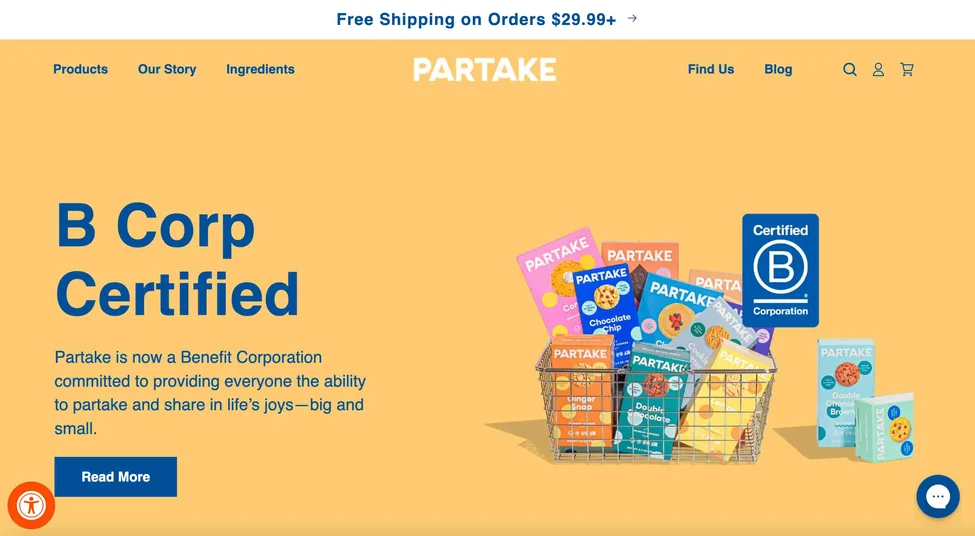
Take a look at the website of Partake, which has a toggle in the bottom right corner where key elements such as text and cursor size can be changed.
Step 5: Keep Your Website Organized to Ensure Consistent Navigation
Good navigation is the key to keeping visitors on your site. Confusing navigation can lead to frustration and folks leaving your site. On the flip side, a well-structured navigation system with organized menus and links makes it easy for people to find what they are looking for.
The website of WWF is a good example of not overloading the design with content, helping the users with easy navigation.

Step 6: Make Your Website Device-Friendly
Your website should look and work great on all kinds of devices. It should be just as awesome on mobiles and tablets as it is on big screens. You don't want stuff disappearing or acting up when people switch devices.
According to Statista, almost 60% of the total web traffic comes from mobile internet traffic. This is why at Aufait UX, we make sure that all our design projects prioritize optimization for various devices, just as we did for the Ed-Tech platform, Lead School.

Step 7: Avoid Content That Triggers Seizures
Flashing lights that go all out can be a big no-no. They can trigger seizures and just make the experience uncomfortable for everyone. So, avoid anything that flashes more than three times in one second.
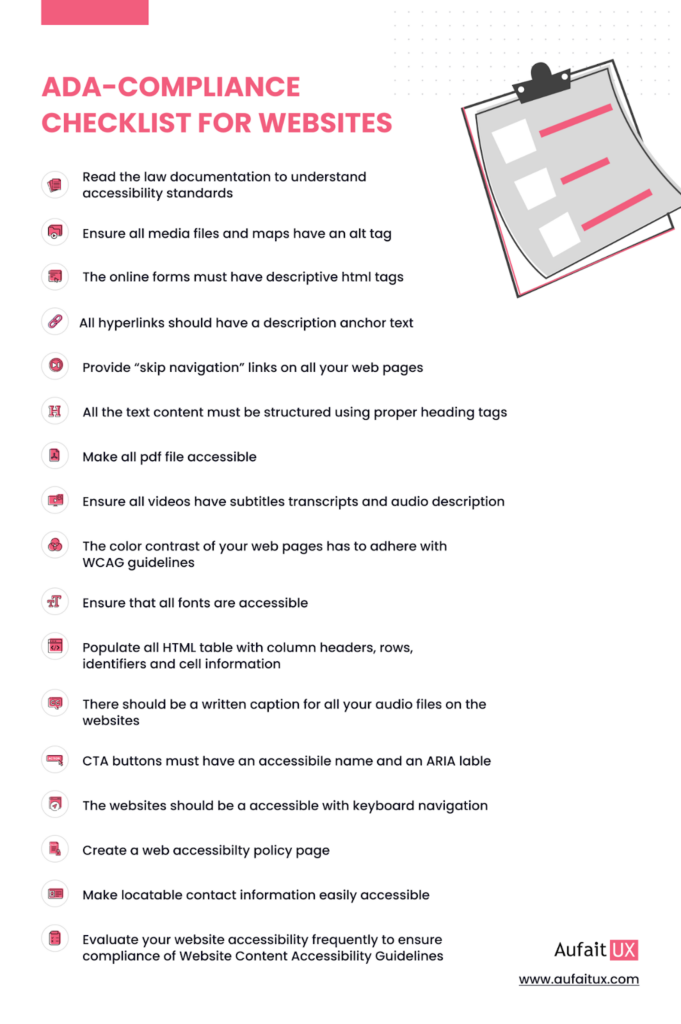
Here’s a comprehensive ADA compliance checklist for you to follow to ensure your website adheres to the accessibility standards
Designing for Digital Accessibility: Make Your Website an Equitable Place
We prioritize designing websites based on parity, integrating accessibility standards from the very beginning of our design process. By ensuring that every design element and code snippet adheres to website accessibility standards right from the start, our UI UX design services walk along with companies so that they can proactively avoid potential issues down the road.
At Aufait UX, a leading UI UX design company, we place a strong emphasis on digital accessibility considerations, valuing the equal treatment of all our users. It is crucial to recognize that the best products are accessible by default, so ensuring WCAG compliance and digital accessibility compliance should be your top priority.
Not sure if your current website measures up? Our UX Design Audit identifies every accessibility gap on your site and gives you a clear, prioritized action plan to fix it, before it becomes a legal liability. Get Your Free UX Design Audit
🔔Follow Aufait UX on LinkedIn for strategic insights grounded in real-world product outcomes.
Disclaimer: All images belong to the rightful owners!
FAQs:
The April 24, 2026, Department of Justice (DOJ) deadline requires public entities to make their websites and digital services accessible under the updated ADA Title II ruling. This has created a surge in searches from organizations trying to understand compliance requirements before the deadline.
While older regulations focused on WCAG compliance under WCAG 2.1 AA, many organizations are now shifting toward Web Content Accessibility Guidelines 2.2 AA. The updated standards better support mobile usability, cognitive accessibility, and modern interaction patterns, making them a smarter long-term choice for building an ADA compliant website. It also helps websites perform better in AI-generated answers and voice-driven search experiences.
You do not always need a complete rebuild to improve digital accessibility or create an ADA compliant website. Many businesses start with smaller fixes like improving color contrast, adding alt text, and fixing keyboard navigation issues to align with modern website accessibility standards. These improvements not only reduce compliance risks but also make content easier for search engines, answer engines, and LLMs to understand.
AI accessibility tools can help identify basic problems, but they cannot fully guarantee WCAG compliance or complete digital accessibility compliance. Automated overlays often miss complex usability barriers involving screen readers, forms, and interactive experiences that require human testing. For long-term accessibility and stronger visibility in AI-driven search, businesses still need thoughtful UX and manual accessibility reviews.
Some of the most common accessibility issues include missing alt text, keyboard-inaccessible menus, poor color contrast, and videos without captions. These problems directly violate modern accessibility standards and frequently become the reason businesses face ADA-related lawsuits. They can also reduce visibility in AI search results, where accessible and user-friendly websites are increasingly prioritized.
Table of Contents
Your competitors are ADA compliant. Are you?
Ensure ADA compliance with our UX audit services!
Contact us