Most Enterprise UX Audits Break Down Before Implementation. Here’s What Aufait UX Does Differently.

Stop settling for reports that sit on a shelf. Get a prioritized, phased strategy that clears your design debt and scales with your team.
Summary
Most enterprise audit engagements produce reports that go unread and roadmaps that go unused. This piece covers four structural reasons enterprise UX audit services consistently fail at implementation, and the four-part audit methodology Aufait UX uses instead, built on role analysis, systems-level workflow mapping, prioritized roadmaps, and phased implementation planning that accounts for what real teams can actually absorb.
Enterprise software carries enormous weight. It drives revenue, shapes the daily lives of a thousand-strong workforce, and is often the amalgamation of decades' worth of knowledge, logic and protocols.
And yet, most UX Audits treat enterprise software with the lens as with a consumer app. That’s where things start to fall apart.
This article breaks down why enterprise audits fail, not just in theory, but even in implementation, and what a more efficient approach looks like.
Enterprise Products is a Different Ballgame
Before we dive into a UX design audit, it’s worth being clear about what differentiates enterprise UX from regular, consumer-facing products.
Consumer products are built for a diverse audience and drive adoption or retention. When a product starts creating friction, users can simply choose to leave or ‘abandon cart’. The feedback loop is almost instantaneous and unforgiving. But in turn, this helps keep the design very high quality.
Enterprise products work the other way around. The users who rely on it are often experts in their field and have no choice but to use the systems built or licensed by their leadership. They simply struggle through the process, and inadvertently, productivity suffers. Errors accumulate. And one day, resentment reaches a breaking point.
This is almost directly linked to the structural problem that is plaguing enterprises; the buyer is rarely the user. The executives worry about features and price, while people in the trenches care more about getting their job done without raging against the machine. These are two very different conversations, while many UX audit services still end up listening to only one of them.
The Pitfalls of Enterprise UX Audits
1. Design Debt That No One Owns
Enterprise systems don’t start out fractured; they accrue fissures and cracks over time. As legacy systems become layered with new features and modules, they lead to what we would call a Frankenstein experience: a messy, patchwork system roughly sewn together.
Most UX audit services spend the majority of their time clearing up this UX debt. But clearing it with no context on how the platform got there leads to recommendations that look good in presentation but fall apart in practice.
Learn how to prevent UX debt altogether by future proofing your platform in this article.
2. Mission-Critical Systems That Can’t Be Rebuilt
An understandable impulse when confronted with a broken system is to tear it down and start fresh. However, in enterprise grade systems, some workflows form the operational backbone of an organization, where disruption is synonymous with loss.
With thousands of workers relying on them daily, with major compliance obligations balancing together like a Jenga tower, with complex permission structures and data security frameworks, simply pulling the lever is not an option.
The right approach isn’t a full-blown revolution but rather very progressive remediation.
3. Personas Break Down at Enterprise Scale
The humble persona as the pillar of all UX activity is a valid choice when faced with consumer products, where user preferences and behavior drive decisions.
When it comes to enterprise, however, the framework starts to fray. Users aren’t individualistic for the most part; they come with specific roles. They don’t use the software based on personal preference; they use it based on what their role demands. Two people in the same role at the same organization are highly likely to have identical use cases.
This means that audits done through personas tend to miss the point. What really matters is an understanding of roles, responsibilities and touchpoints of major user roles of the products.
4. Workflow Silos Are Invisible Until They’re Not
Complexity at the scale of enterprise is a breeding ground for tunnel vision. Each team evolves with its own protocols and workarounds, completely independent of other connected teams. When audits consult these teams in isolation, they will miss the breakdown of communication and handoff at the synapses of cross-functional teams.
A strong enterprise UX strategy looks beyond individual interfaces and studies how information, responsibilities, and collaboration move across the organization as a connected system.
How Aufait Approaches Enterprise UX Audit Services
Tracing dysfunction is the easy part. Auditing in a way that survives contact with implementation is much harder. Here is the approach we’ve perfected over the years.
Method 1: Breaking Down Roles & Responsibilities
We don’t start with screens, we start with the people; with the roles they hold and the goals they must achieve.
This looks like mapping the ecosystem of who uses the product, what they’re responsible for, what decisions they make, and what information they need to make those decisions.
This is exactly how we approached one of our recent projects while redesigning an enterprise-grade Infrastructure Management platform. We had to account for user-role configurations across multiple modules, along with the interactions connecting different user groups. Understanding how these users collaborated within the system helped us create recommendations that aligned with real workflows rather than theoretical use cases.
Method 2: Prioritization Intelligence
A pattern we’ve seen often: 80-page UX audit reports that nobody bothers to read, let alone implement. Length isn’t always an issue, however. The problem is the lack of a clear signal about what to tackle first. When everything gets equal weightage, it’s the same as none.
To undercut this effect, we use an Effort vs. Impact matrix that helps us funnel resources and time down the most effective path. This helps us produce a clearly prioritized roadmap.
We’ve applied this approach across multiple product audits, including a large-scale Interior Design platform built for amateur creatives and homeowners. Since implementation was happening in parallel with engineering teams, our prioritization framework helped identify high-impact improvements early, allowing the product team to maximize usability gains while keeping development effort focused and efficient.
Method 3: Thinking in Systems
Enterprise software doesn’t exist in isolation; it connects to other systems, “feeds” on various data sources and sits within a broader network of collaboration. An audit that only looks at screens can miss the big picture.
Here at Aufait UX, we also see how information flows across the product, where communication breaks down and where the real friction lives, which is usually in in-between places. This is the difference between treating an audit as a design review, vs treating it like a structural intervention.
When we were tasked with course-correcting an Asset Management Dashboard for Private Credit Managers, this was our starting point. We broke down the distinct workflows and interconnected islands before we touched a single interface element. The result was that we made systems visible and insights actionable.
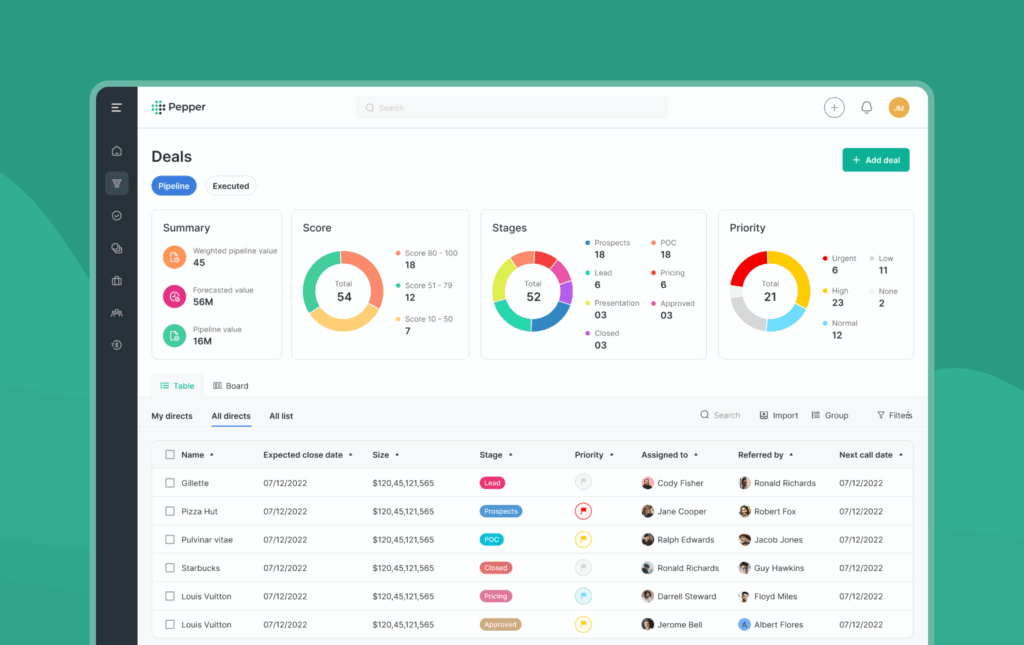
Caption: A high-impact Asset Management Dashboard designed through deep role analysis.
Method 4: Staggering Implementation
Recommendations can fail if they’re introduced too fast, too broadly, or without accounting for the operational reality of systems they’re applied to.
We plan for implementation in stages. By phasing in change carefully and retiring legacy components progressively, existing functionality is preserved until the switch is possible. Compliance-sensitive areas get treated with the scrutiny they need.
This isn’t caution for the sake of caution. It’s the only approach that works at enterprise scale because an audit that can’t support implementation is just an overpriced document.
A Word on AI-Assisted UX Audit Services
There’s a growing interest in using AI tools to accelerate UX audit services, and there is value in what these tools can do, pattern recognition and analysis at scale.
But AI tools don’t understand the organizational context. They can’t read the tension between a compliance requirement and a usability need. They can’t understand why a workflow that might not work on paper is exactly what the team needs.
The future of auditing isn’t replacing human judgment with AI, but rather humans using AI to do more of the busywork, and then applying the kind of contextual intelligence that no model can replicate.
Conclusion
Enterprise UX audits fail for predictable reasons. Recommendations are built on incorrect assumptions, personas take the place of roles, and final reports sit in a folder, because no one knows where to begin.
This is not inevitable. But to overcome it, Enterprise Audit needs to be treated for what it is: a structural problem, not a cosmetic one. It requires auditors who understand the operational reality of the systems they’re treating, who can translate findings into a roadmap that real users can follow.
Is Your Enterprise Software Creating Hidden Productivity Costs?
At Aufait UX, we see AI as a powerful acceleration layer within the audit process. Our structured UX design audit services deliver a prioritized implementation roadmap built on role analysis, systems-level workflow mapping, and the operational reality your teams work within every day.
Partner with Aufait UX for expert UX strategy and results-driven UX consulting services. Request an Audit Consultation
🔔Follow Aufait UX on LinkedIn for strategic insights grounded in real-world product outcomes.
Disclaimer: All images belong to the rightful owners!
Frequently Asked Questions
Professional UX audit services identify hidden productivity costs that surface-level reviews miss. Unlike standard audits, an enterprise-focused approach uncovers design debt, aligns mission-critical workflows with user roles, and provides a prioritized ux audit report that balances business logic with user efficiency. This ensures that software improvements directly impact the bottom line without disrupting daily operations.
Most audits fail because they focus on cosmetic UI changes rather than structural operational realities. They often rely on generic personas instead of specific role analysis and fail to account for the Frankenstein nature of legacy systems. At Aufait UX, we overcome this by delivering a phased ux strategy that real-world engineering teams can actually execute without breaking the system’s Jenga tower of dependencies.
In consumer apps, users leave if the experience is poor; in enterprise systems, users are forced to adapt, creating inefficient workarounds. An effective ux strategy for an enterprise recognizes that the buyer is rarely the user. It focuses on reducing cognitive load for expert users who handle high-stakes data, ensuring that the ux consulting services provided are tailored to professional roles rather than personal preferences.
Usability testing services help enterprise UX audit services evaluate how different teams actually interact with the platform in real working conditions. Instead of relying on generic user journeys, testing is structured around role-based workflows, responsibilities, and operational tasks specific to each user group. This helps uncover friction points that directly affect productivity, collaboration, and day-to-day efficiency across enterprise systems.
Timeline depends on the scope of the platform and the number of user roles involved in the engagement. A focused module-level audit with UX consulting services support typically runs three to four weeks. A full platform audit, including cross-functional workflow mapping, usability testing services, prioritization analysis, and implementation roadmap development generally runs six to ten weeks. Prioritization and phased roadmap delivery are included within that timeline, because the UX audit report is an intermediate output.
Table of Contents
Don’t Let Your UX Debt Stall Your Digital Transformation
Our UX audits map the people, the roles, and the workflows that drive your business forward.
Let’s Audit