AI in UI UX Design: What the Hype Gets Right, What It Gets Wrong, and What We Actually Do

Every AI design tool promises to change how you work. Few actually do. We've tested, debated, and built with them on real projects. Here's what held up.
Summary
This blog is about using AI in UI UX design without losing your head over it. I talk about the tools we use at Aufait UX, like Figma Make for complex flows, Uizard for visual iteration, Mokkup.ai for data-heavy dashboards, and what each one is good at. I also share insights from real projects we’ve worked on. Each experience taught us important things about where AI genuinely speeds up design work, where it supports better exploration, and where a designer still needs to lead the thinking. The takeaway is that AI is a real part of our process. But the judgment calls still belong to us.
Here's a significant point most AI design content won't tell you upfront.
A lot of the conversation around AI in UI UX design sounds polished, optimistic, and future-ready. Faster workflows! Smarter personalization! Predictive experiences! And yes, those things are real. They matter.
But somewhere between the demos, dashboards, and automation hype, another layer of reality starts becoming impossible to ignore.
A researcher sitting in the afternoon heat of a Tier 3 city notices hesitation on a user’s face that never appears in analytics. A usability session reveals emotional friction that no AI model flagged. A “high-performing” flow still leaves people confused, rushed, or disconnected.
That’s the part I want to talk about.
AI hasn’t just changed the tools on my desktop. It’s changed how I think about design itself. It’s changed what I defend in stakeholder discussions, what I question during product reviews, and where I’ve had to push back on assumptions around what “smart experiences” are supposed to look like.
This piece aims to discuss that shift honestly.
Let's Start With Why Everyone's Talking About AI in UI UX Design Right Now
AI is becoming a major part of UI UX design because businesses are under pressure to create experiences that feel more personalized, efficient, and intuitive.
The numbers explain why.
Research findings of McKinsey show that 76% of consumers are more likely to buy from brands that personalize experiences. 78% are more likely to recommend those brands to others. 78% are more likely to return and buy again.
AI helps products deliver that level of personalization at scale.
- Platforms like Netflix Recommendation System personalize content based on viewing behavior. Different users often see different thumbnails, recommendations, and layouts based on what they usually watch.
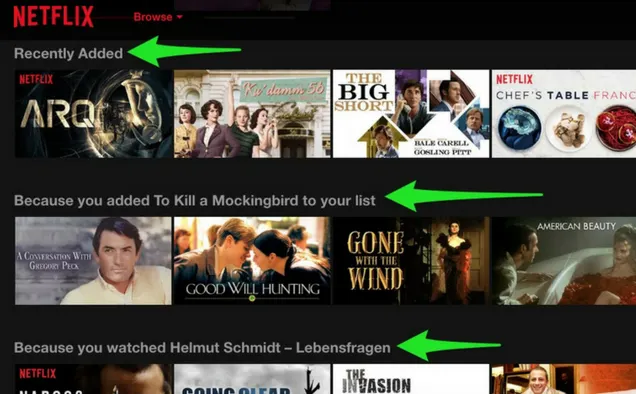
Caption: The image demonstrates how Netflix personalizes recommendations, content rows, and viewing layouts differently for each user based on their watch history and behavior.
- Spotify Discover Weekly uses listening patterns to recommend music that users are likely to enjoy. The experience feels simple, while the system continuously learns from user behavior in the background.

Caption: The image showcases Spotify’s personalized “Discover Weekly” experience, where music recommendations are tailored based on individual listening habits and preferences.
- Amazon also adapts product suggestions, page layouts, and shopping experiences based on browsing history, purchase activity, and user intent.

Caption: The image highlights Amazon’s personalized shopping experience with dynamically tailored product recommendations, browsing sections, and content based on user activity and intent.
This is why AI in UI UX design matters right now.
It helps teams create experiences that feel more useful, more relevant, and more responsive to user behavior. It also helps businesses improve engagement, retention, and conversion through smarter product experiences.
At the same time, successful AI-driven experiences still depend on strong UX thinking, clear user understanding, and thoughtful design decisions. AI supports the process. Human understanding still shapes the user experience.
AI Design Tools Are Smart. The Thinking Still Has to Be Yours
Let me tell you about a project.
We were designing a community platform for users in Tier 3 and Tier 4 cities across India. The original brief came with assumptions that looked reasonable on paper. Most of them were shaped by urban digital behavior.
Our research team went into the field and conducted ethnographic research, spent time with people in their actual environments. We observed how they used devices, accessed content, interacted with family members, and navigated digital platforms in daily life.
Our finding in the research changed the direction of the product completely.
Digital consumption in these communities wasn't individual. One device often belonged to an entire family. In some cases, neighbours used the same phone. Internet access changed throughout the day. Electricity interruptions affected usage patterns. Social dynamics influenced which content people trusted, ignored, or shared with others.
No AI tool surfaced that finding. A researcher on the ground did.
And here's why that matters for everything we're about to talk about:
“AI is extraordinary at pattern recognition across known datasets. But the most consequential design insights come from situations that fall outside the pattern.”
If we'd handed this project entirely to an AI design tool and called it good, we'd have built a product that looked polished and technically sound and fundamentally wrong.
So Where Does AI Actually Fit?
Here's the honest answer: AI earns its place in the parts of design that eat up your time without requiring your judgment.
It helps generate wireframe variations quickly. It speeds up layout exploration and helps teams test visual directions earlier in the process. It can check responsiveness across breakpoints, organize design systems, generate content structures, and even produce developer-ready code references.
Instead of getting stuck in repetitive execution work, teams can focus more on product thinking, research, usability discussions, stakeholder alignment, and decision-making that requires human judgment.
At Aufait UX, this thinking led us to build a framework called HAID: Human + AI in Design. It maps the entire UX design process, such as Discover, Define, Design, Validate, and Deliver and clearly defines what AI should handle and where designers need to lead.
We use AI to accelerate process-heavy tasks so our teams can spend more time understanding users, identifying structural UX issues, improving flows, and shaping experiences that make sense in real-world contexts.
Because the most important design decisions still come from observation, conversations, business understanding, and human interpretation.
And that’s where design continues to stay deeply human.
Our Honest Take: The AI Design Tools We Actually Use
Figma Make: Best When the Flow Is Too Complex to Crack Manually
Figma Make works like an AI collaborator you can have a real conversation with. You write a prompt, it generates screens, you push back, it revises. And unlike most AI design tools, it remembers earlier versions, so if you hate the direction it took, you can roll back and try a different thread.
That's more useful than it sounds. Design is iterative. The ability to go back and forward through a conversation rather than starting over from scratch saves hours inside a real AI in UI UX design workflow.
Here's where it helped us.
We were working on a health tech platform for an R&D management team. The requirement was a unique report generation flow. We would have already spent time studying Salesforce and Power BI. We couldn't crack the complexity; everything we came up with either borrowed too heavily from existing patterns or didn't reduce the interaction load enough.
We wrote a prompt that synthesised what we had learned from those reference products alongside our own design thinking. Figma Make created a structural thread we hadn't considered. That thread opened a direction that was different from the reference products.
- The practical win nobody talks about:
You can copy Figma Make outputs as actual editable frames rather than screenshots. That means you're not redrawing an idea from an image. You're working directly in your design file from day one. For developers, there's component code and style output too, which makes collaboration faster across teams using AI tools for UI UX designers.
- The honest limitation:
The visual quality isn't there yet. It's functional, not distinctive. You'll generate multiple versions before you find something worth building on. Treat it as structural scaffolding. It doesn’t produce a finished design.
- Model selection matters:
We use Gemini 2.5 Pro for complex flows that need deep reasoning, Flash models for rapid iteration cycles, and Claude Sonnet when we want a balance of structural logic and creative quality.
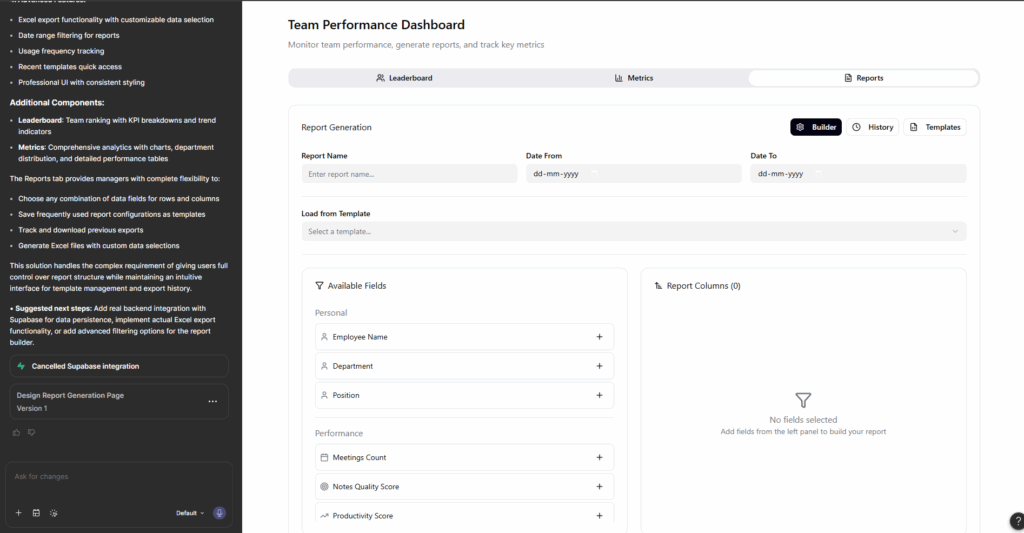
Caption: Snapshot from our Figma Make workflow while exploring a complex report-generation flow for a health tech R&D platform, using AI-assisted iteration to simplify interactions and structure large data inputs.
Uizard: Best for Visual Iteration and Early Usability Signals
We use Figma Make to figure out the structure first. Then we use Uizard to figure out how the experience should look and feel.
Our workflow:
We take the wireframes created inside Figma Make, upload them to Uizard, and generate multiple visual directions quickly. It gives you style explorations fast, which is exactly what you need when a client's brief is clear on function but vague on feel.
What makes Uizard different from most AI UI design tools is precision. You can select a single element, such as a button, an icon, or a specific section, and modify just that through a chat interface. The platform updates the selected component without regenerating the entire screen. That makes iteration faster and keeps the existing design structure intact.
The feature I find most underrated is design review. Uizard's AI gives feedback from a user's perspective and includes a focus predictor, which shows you where the eye is likely to land first on any given screen.
Is that a replacement for real usability testing? No. But as an early signal during ideation, before you have invested time in high-fidelity work? It's genuinely useful.
Mokkup.ai: A Niche Tool With a Clear Job
If you're designing data-heavy products such as Power BI dashboards, Tableau interfaces, analytics platforms, Mokkup.ai works better than a general tool.
It's focused specifically on wireframe-level thinking for data layouts. Where do the charts go? Which metric needs to be above the fold? What chart type serves this data structure? You can refine suggestions by feeding in actual data, which means the output reflects real structures rather than placeholder content.
For UX designers: It's a clarity tool. It helps you work out the information architecture before you've committed to anything in Figma or moving further into AI in UI UX design workflows.
One thing to keep in mind: You can only export as JPEG or PNG. That means Mokkup outputs become reference images in your Figma file rather than editable design components. And unlike the other tools, there's no conversational refinement; you can't iterate through a chat interface. What you generate is what you get.
For the right kind of project, it does its job well.
What AI Is Changing in Product Experiences
Here's where I want to zoom out for a second.
Beyond the design workflow, AI is making a significant impact on the products we build. Machine learning is reshaping what users expect from digital experiences. And the bar for personalised user experience keeps rising.
Users aren't just tolerating generic interfaces anymore. They expect things to feel like they were made for them. Static, one-size-fits-all design is starting to feel like a product quality problem.
The brands doing this well are not just showing you a "you might also like" row at the bottom of the page. They're adapting the entire interface, like content hierarchy, calls-to-action, and visual emphasis, based on behavioural data that's continuously learning.
1. Behavioural segmentation
A big part of this comes from behavioural segmentation. AI groups users by actual behaviour patterns. A user who repeatedly visits a product page without purchasing gets a different experience than one who adds to the cart within sixty seconds of landing. That's a design decision. It just happens to be made by a machine in real-time.
2. Natural language processing
LLM is changing interaction design. Chatbots and voice interfaces are getting conversational, understanding context, maintaining threads across sessions, and personalising responses based on previous interactions. That changes how you design the flows around them.
3. Predictive personalisation
Predictive personalisation is becoming part of everyday product experiences as well. Systems that anticipate what a user wants before they've asked for it. Spotify's Discover Weekly is the example everyone cites. It uses listening behaviour to predict what users are likely to enjoy next.
The same thinking is now appearing across healthcare platforms, fintech apps, learning products, and e-commerce systems focused on delivering a stronger personalized user experience.
The opportunity for businesses is real. The brands that build this well now will be extremely hard to catch.
The Part Nobody Wants to Talk About AI UX Design
Here's the honest ethical layer to all of this.
1. Privacy Is a Design Responsibility
Personalization at scale requires data at scale. Users have a right to know what you're collecting and why. Designers are increasingly involved in those conversations because privacy directly affects trust, usability, and product perception.
2. Over-Personalization Is Real
There's a specific kind of discomfort that happens when an interface feels like it knows too much. When an ad appears for something you were just thinking about. When a recommendation feels like surveillance. Calibrating the intimacy of personalized user experience, finding the line between helpful and invasive, requires judgment.
3. Bias Still Travels Through AI Systems
A model learns from data. If the data reflects historical patterns that exclude or misrepresent certain groups, the personalized experience will too. Diverse research participation, qualitative methods, and human judgment in the loop still matter, even when the AI is doing most of the analytical work.
These aren't reasons to avoid AI-powered personalization. There are reasons to build it carefully.
Why AI-Powered Personalization Is a Business Necessity
Users have moved on from generic. They expect interfaces that know them, flows that fit them, and experiences that feel built for how they actually behave.
The businesses getting this right are investing in understanding their users first and letting AI scale that understanding across every touchpoint. That's the difference between personalization that feels useful and personalization that feels intrusive.
If your product is still serving every user the same experience, that gap is widening every day. The brands building smarter now are going to be very hard to catch later.
At Aufait UX, we’re not just keeping up with these trends; we’re helping to shape them. The HAID Framework is how we structure that work: a principled approach to human and AI collaboration in design, refined through real product work spanning health tech, enterprise platforms, compliance systems, and field operations.
With a deep understanding of AI, ML, and the power of personalization, we’re equipped to help businesses build next-gen digital products that don’t just meet user needs but exceed them.
Explore Our UX Design Services
Let’s work together to craft experiences that are as unique as your users.
🔔Follow Aufait UX on LinkedIn for strategic insights grounded in real-world product outcomes.
Disclaimer: All images belong to the rightful owners!
FAQs: AI in UI UX Design
In the current market, static interfaces are becoming a competitive disadvantage. Investing in AI personalization UX allows businesses to scale 1:1 engagement that was previously impossible. By leveraging ML to predict user needs, brands can significantly improve conversion rates and stay ahead of rising consumer expectations for smart digital products.
Yes. The primary risks include algorithmic bias, where AI reflects the prejudices found in its training data, and over-personalization, which can lead to privacy concerns. Responsible ai ux design requires designers to act as ethical gatekeepers, ensuring data transparency and maintaining a human-in-the-loop to correct biased outputs.
In a professional AI UI design workflow, these tools serve different stages: Figma Make is best for cracking complex logic and generating editable structural threads, whereas Uizard is superior for visual style exploration and getting quick feedback on where a user's attention might land on a screen.
No. While AI tools for UI UX designers are excellent at pattern recognition within large datasets, they cannot conduct ethnographic research or observe hidden user frictions in diverse environments. Human researchers are still essential for identifying cultural nuances and emotional triggers that data-driven models often miss.
AI and ML in UI UX help create inclusive designs through voice recognition, real-time translation, image-to-text conversion, and adaptive font scaling. These features make digital products more accessible to users with disabilities.
Table of Contents
Ready to Build Smarter Digital Experiences With AI?
Let’s Design an AI-Powered Experience Your Users Will Love.
Talk to Our Team