AI Automation UI/UX Design Tools: How 2025 Is Rewriting the Rules of Creativity


Design used to be about tools. Now, it’s about smart solutions. Here’s how AI is changing the game for designers everywhere.
Here’s the thing: designers are wired to think creatively. However, in 2025, we’re witnessing a significant shift in what it means to "create." The design world is no longer just about sketching out ideas and fine-tuning wireframes until your eyes blur. Instead, we’ve entered an era where AI Automation UI/UX Design Tools are not just helping us design—they're pushing us to rethink the very way we approach the craft.
And honestly? It’s mind-blowing.
The tools we have today are smart. Like, really smart. They’re not just speeding up repetitive tasks or making things more efficient; they’re becoming creative collaborators, predicting user behavior, suggesting design ideas, and even testing interfaces in real-time. So, are we talking about the end of human design? Far from it. What we’re witnessing is the beginning of a more powerful, more creative UI/UX design process where AI becomes our co-pilot, not our replacement.
Take a pretty big knowledge scoop from AI and ML in UI/UX Design | 2025 Trends and Impact
Making Design Effortless: How AI Automation UI/UX Design Tools Are Streamlining Your Workflow
Let’s rewind for a second. A few years ago, the process of creating a user interface felt almost like putting together a puzzle with no edge pieces. You had to wireframe, prototype, iterate, test, rinse, repeat—by hand. It was rewarding, sure, but also exhausting.
Fast forward to today, and automation is stepping in like a hero during crunch time, handling the more repetitive and technical aspects of the design workflow. Now, you can shift your focus to what matters: crafting engaging, human-centered experiences.
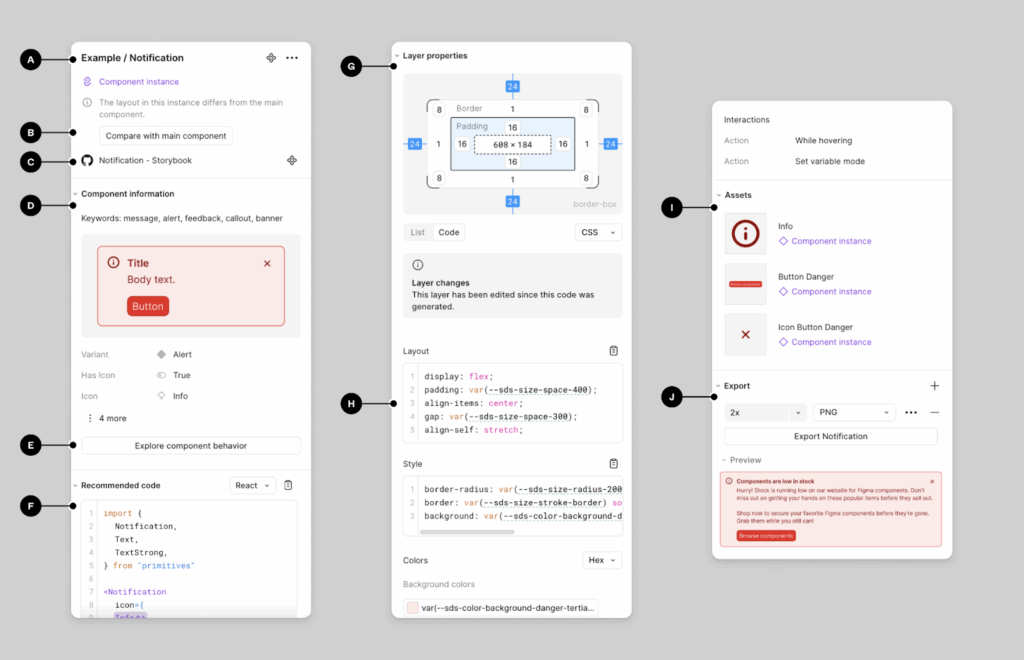
Take tools like Figma. We’ve loved it for its collaboration features for years, but in 2025, it's the new AI features that are grabbing headlines. The "Autolayout" feature—remember when that was revolutionary? Now it’s taken to a whole new level. With built-in machine learning, Figma AI features can predict how your elements should be arranged based on previous designs.
Given below is a screenshot of real-time processing of design requirements in Figma.
Now imagine this:
You're tasked with designing a multi-screen app. Instead of manually adjusting each screen size, you hit a button, and the layout automatically adapts—everything shifts, aligns, and resizes itself to fit perfectly. You tweak here and there, but the bulk of the tedious, pixel-pushing work? Done. That’s the magic of automation today.
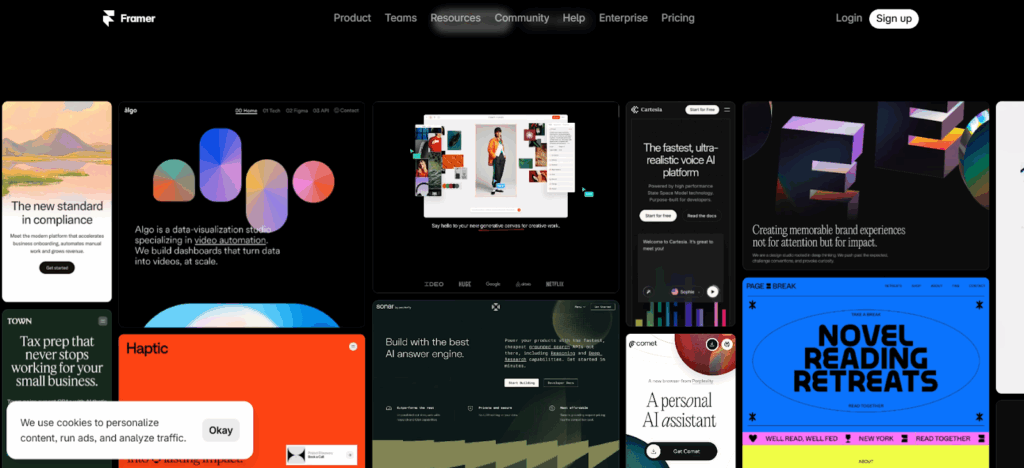
And tools like Framer AI? They’re breaking ground too. Framer has moved beyond just prototyping tools. Now, you can literally type "Create a sleek e-commerce landing page," and the AI Automation UI/UX Design Tools will generate an entire layout, suggest interactions, and even optimize the user flow for you. Wild, right?
This isn’t just speeding up design. This is transforming how we design. The best part? It gives us more time to explore the creative, human side of our work—where we thrive.
AI as a Design Co-Creator: Not Just Speed, But Strategy
Here’s where things get even more exciting. In the past, AI and automation were mainly about cutting down on time-consuming tasks. But in 2025, these tools aren’t just saving time—they’re actively contributing to the creative process. They’re learning from users, predicting behavior, and suggesting ideas you might not have considered.
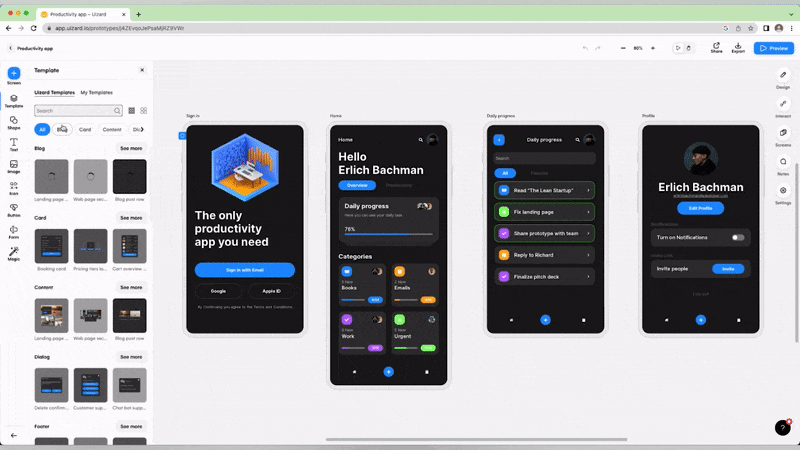
Think of AI as your personal design strategist. Tools like Uizard and Lookback analyze data from user interactions and feed it back into the design process in real-time. They’re looking at how users are interacting with your designs—where they’re dropping off, where they’re confused—and suggesting fixes before you even realize there’s a problem. Take a look at how a design team is collaborating in real-time on Uizard.
Check out our blog, which is an interesting compilation of usability tools: Top 10 Usability Testing Tools to Try in 2025
Here’s a scenario
You’re designing an onboarding flow for a mobile app. You’ve got the flow mapped out, but something feels off. Instead of spending hours in user testing, you tap into AI-driven user insights. Tools like UsabilityHub or Maze can now simulate user behavior and highlight weak spots in your design, all while you’re still in the prototyping automation phase.
And because these insights are automated, you get real-time feedback on what works and what doesn’t—no more waiting for days to gather data. The UI/UX design process becomes less about guesswork and more about informed, strategic decisions. AI is like having an analytics team built into your design tool.
Now, you can also check out Articulating design decisions: Designers MUST master this important soft skill
Creative Playgrounds: How Generative AI Sparks New Ideas
Now let’s talk about the fun stuff—creativity. AI isn’t just about making things easier or faster. In 2025, AI is also becoming a source of inspiration. This is what generative UI UX design tools are for.
Tools like Runway ML and Jasper AI aren’t just automating design tasks; they’re helping us explore new design territories. They can generate endless variations of a single concept, remixing elements in ways that push the boundaries of what’s possible.
Imagine This Scenario:
You’re working on a futuristic dashboard interface, but you want it to stand out—something fresh, something that feels ahead of its time. You input some rough sketches into Runway ML, and it generates an array of possible designs, each one experimenting with colors, shapes, and layouts in ways you wouldn’t have imagined. One catches your eye—something about its asymmetrical layout and bold typography just works. Boom, you’ve got your next big idea.
Take a look at the comprehensive dashboard design we created for IQnext.
Also, read our rich and informative blog on Key UI/UX design principles for effective dashboard design
Looking for expert dashboard design services? Let's connect for an insightful discussion and explore how we can bring your vision to life.
Letting AI Help Us Design User Experiences That Feel Just Right
One of the biggest breakthroughs in 2025 isn’t just about how we design, but who we’re designing for. Personalization has always been the holy grail of UX, and now, with AI in the driver’s seat, we can design experiences that are more tailored than ever.
With tools like Dynamic Yield and Adobe’s Sensei, designers are able to create user experiences that adapt in real-time based on individual behaviors. Let’s say you’re designing an e-commerce platform. Instead of showing the same layout to every visitor, AI personalizes the interface for each user. Someone who frequently shops for tech gadgets? They see a streamlined, product-focused layout. Someone who browses casually? They’re presented with a more editorial, discovery-driven experience.
Think About This:
You’re no longer designing a one-size-fits-all interface. Instead, you’re designing frameworks that adapt, grow, and respond dynamically to each user’s needs. It’s like creating hundreds of micro-experiences—all through the power of automation.
Venturing Into the AI Revolution: Are Designers Becoming Technologists?
Here’s a thought that’s been creeping up lately: with AI tools getting so advanced, are designers slowly morphing into technologists? Not quite, but there’s definitely a shift happening. Designers today need to understand the underlying algorithms and AI capabilities embedded in their tools to get the most out of them.
Understanding how AI works behind the scenes can empower designers to push boundaries. Take AI-based design systems like Stark or Sympli that can test color contrast, evaluate accessibility, and ensure compliance with industry standards. This level of detail used to be something only a handful of specialists could handle, but now it’s accessible to everyone through AI automation.
These tools are becoming the bridge between creativity and technology, helping designers stay grounded in the creative process while being empowered by tech like never before.
What Lies Ahead: The Future of AI Automation UI/UX Design Tools
As we stand here in 2025, the possibilities that AI and automation can bring to design are exhilarating. We’re just scratching the surface. The more we embrace these tools as creative collaborators, the more we can unlock our own potential as designers.
But what’s next?
Imagine more intuitive design systems that automatically update based on real-time user feedback or AI that can predict emotional responses to specific design choices. We might even see the rise of AI-generated personas that evolve dynamically based on user interaction data, offering a deeper understanding of the target audience.
One thing is clear: automation and AI are pushing us into a future where design isn’t just a craft—it’s a blend of science and art. It’s an experience that gets more human with every click, every scroll, and every interaction.
Wrapping It All Up: Designers Aren’t Losing Creativity, They’re Amplifying It
Designers, you are not losing your creative touch. You are amplifying it.
By embracing AI Automation UI/UX Design Tools, we’re finding ways to refine our ideas faster, learn from data more efficiently, and explore creative possibilities we never thought possible. The future of design isn’t about machines taking over; it’s about humans and AI working together to craft better experiences, smarter products, and more meaningful interactions.
So, if you’re wondering what it’s like to design in 2025—trust me, it’s exciting. The tools have evolved, the process has shifted, and the creativity? It’s just getting started.
The design team at Aufait UX is already on the new tide, and we are eager to implement our ideas soaked in the new technology for our prospective clients. If you have any ideas, let us bring them to life.
Here’s a glimpse into the future of design workspaces—a place where automation, AI, and human creativity come together in perfect harmony. I created this image using ChatGPT. Pretty amazing, right?

That’s where we are in 2025, and it’s an exciting time to be a designer. So, what will you create next?
Disclaimer: All images belong to the rightful owners.
FAQs on AI Automation in UI/UX Design Tools
UI UX automation tools help designers streamline repetitive tasks like wireframing, layout adjustments, and prototyping. Tools such as Figma AI, UX Pilot, and Google Stitch allow designers to focus on creativity and deliver user-centered designs faster while improving efficiency across the workflow.
AI in UI UX design tools automates time-consuming tasks, suggests layout improvements, generates prototypes, and predicts usability issues. By integrating AI into the design workflow, teams can accelerate projects, reduce errors, and create more intuitive and personalized user experiences.
AI-powered design tools like Figma AI, UX Pilot, and Midjourney enhance prototyping automation by quickly generating layouts, mockups, and design iterations. Designers can experiment with multiple concepts in less time, leading to faster decision-making and higher-quality user interfaces.
No. Automated design workflow tools are meant to assist designers, not replace them. They handle repetitive tasks and provide AI-driven insights, but human creativity, strategic thinking, and user empathy remain essential to creating meaningful, high-quality user experiences.
UX design productivity tools increase efficiency by automating repetitive work, generating multiple design options, and analyzing user data. This allows teams to spend more time on creative problem-solving, refining user flows, and delivering better products in less time.
Yes. Tools like Figma AI and UX Pilot allow designers to edit AI-generated screens to ensure brand consistency, accessibility compliance, and alignment with user needs. Designers can refine and iterate on automated designs to achieve precise, high-quality results.
Leading AI UI/UX design tools follow strict data privacy standards. Platforms such as Figma AI ensure user files and data are protected, with AI features used responsibly to assist in design without compromising sensitive information.
Costs vary depending on the tool and subscription plan. Many platforms offer free trials or tiered access. For instance, Figma AI provides AI credits according to subscription levels, while other tools may charge per project or feature usage.
You can start by incorporating AI features into your current tools. Figma AI integrates directly into Figma workspaces, while UX Pilot plugins support prototyping automation. Gradually adopting these tools can enhance efficiency, reduce repetitive tasks, and improve overall UX productivity.
Stay updated by following industry blogs, webinars, and online design communities focused on AI-powered UX/UI tools. Engaging with resources that highlight tools like Figma AI, UX Pilot, and Google Stitch helps designers leverage the latest advancements in AI design productivity and automation.
Table of Contents